GitHub Actions Secret Is Empty: 5 Causes and Safe Checks
If a GitHub Actions run reaches an authentication step but fails with a 401,
a missing input, or an empty environment variable, do not print the secret.
First, add a step that checks only whether the value is available. If that
check fails, inspect the secret’s scope, trigger event, environment, and
reusable-workflow mapping in that order.
First, check availability without exposing the secret
GitHub returns an empty string when an expression references a secret that has
not been set. If you run the deployment command immediately, it becomes harder
to tell whether the secret is missing or the external service is rejecting a
valid credential. GitHub’s
documentation for using secrets
confirms that an unset secret expression evaluates to an empty string.
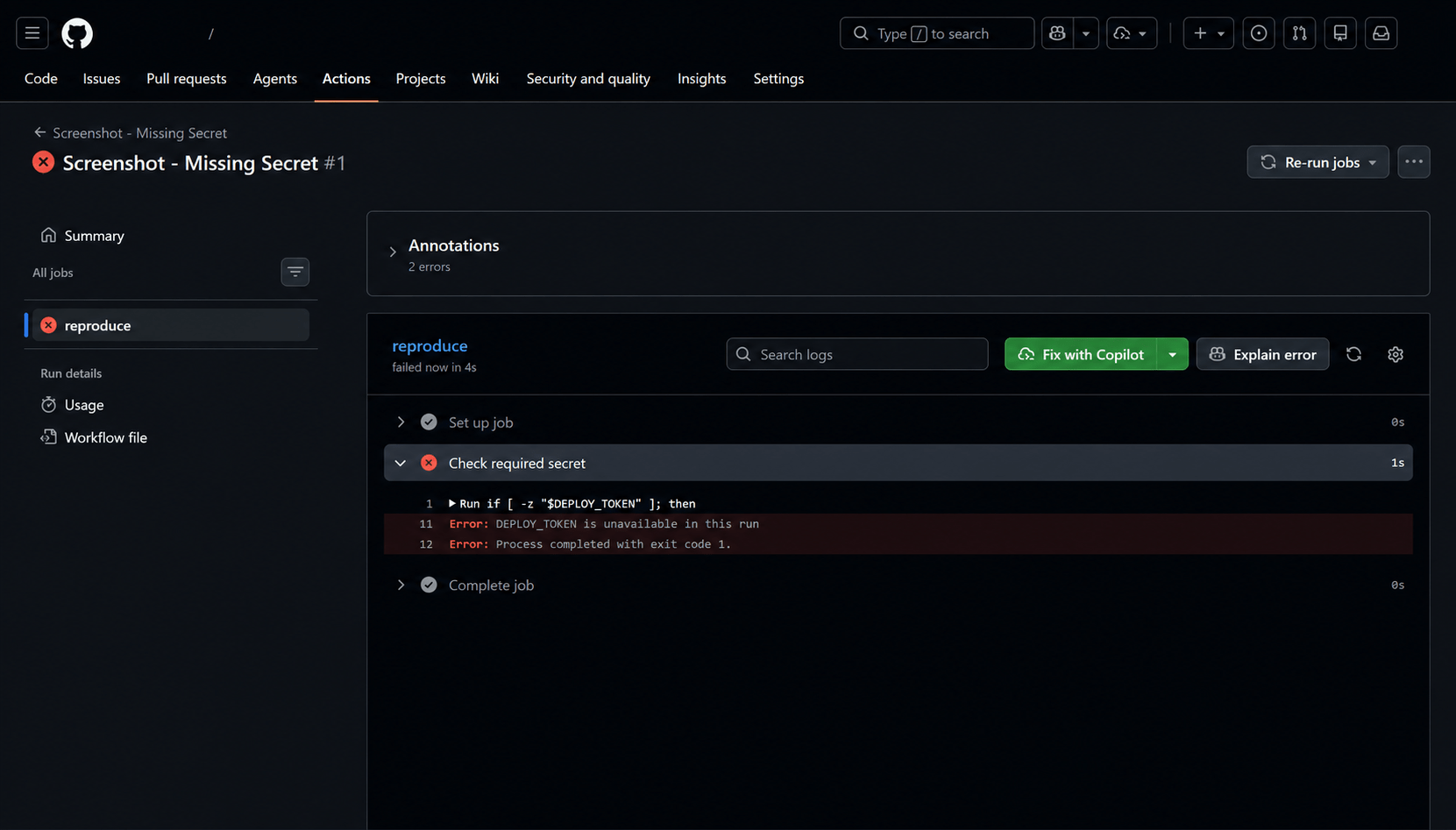
On an Ubuntu runner, add this check before the deployment step:
- name: Check required secret
  shell: bash
  env:
    DEPLOY_TOKEN: ${{ secrets.DEPLOY_TOKEN }}
  run: |
    if [ -z "$DEPLOY_TOKEN" ]; then
      echo "::error::DEPLOY_TOKEN is unavailable in this run"
      exit 1
    fi
    echo "DEPLOY_TOKEN is available"
For a Windows runner using PowerShell, replace only the check:
- name: Check required secret
  shell: pwsh
  env:
    DEPLOY_TOKEN: ${{ secrets.DEPLOY_TOKEN }}
  run: |
    if ([string]::IsNullOrEmpty($env:DEPLOY_TOKEN)) {
      Write-Error "DEPLOY_TOKEN is unavailable in this run"
      exit 1
    }
    Write-Output "DEPLOY_TOKEN is available"
Neither example prints the secret’s value or length. Do not use commands such
as echo "$DEPLOY_TOKEN", Write-Output $env:DEPLOY_TOKEN, or env to dump
environment variables during diagnosis. GitHub masks registered secrets, but
you should not assume that every transformed value or separately generated
sensitive value will always be redacted.
Narrow down the cause from the symptom
| What you observe | Most likely cause | Check next |
|---|---|---|
| The availability check fails in every run | The secret name or scope does not match | Repository, organization, and environment secret lists |
| It passes on a direct push but fails on an external PR | Security restrictions for forked pull requests | Trigger event and PR source |
| It passes on a regular PR but fails on a Dependabot PR | A Dependabot secret is required instead of an Actions secret | Triggering actor and Dependabot settings |
| It passes in a regular workflow but fails in a reusable workflow | The caller did not pass the secret | jobs.<job_id>.secrets |
| The result changes when the same job uses an environment | Environment scope or same-name precedence | jobs.<job_id>.environment |
| The workflow fails validation before it starts | secrets is referenced directly in if: |
Move it to env, then check it in the step condition |

Cause 1: The secret is stored in the wrong scope
Actions secrets can be stored at the repository, environment, or organization
level, but each level has a different access scope.
- Repository secret: available to workflows in that repository
- Environment secret: available only to jobs that reference that environment
- Organization secret: available only to repositories allowed by the organization
These scopes are summarized in GitHub’s
secret types reference.
In the repository that contains the workflow, open:
Repository
→ Settings
→ Secrets and variables
→ Actions
→ Secrets
Check only whether the name DEPLOY_TOKEN exists. GitHub does not reveal the
stored value after it has been saved. If the value may be wrong, do not try to
recover it. Create a new credential at the issuing service and update the
secret instead.

For an organization secret, confirm that the current repository is included in
its Repository access policy. As of July 26, 2026, GitHub’s documentation
also states that organization-level secrets and variables are not accessible
by private repositories on GitHub Free. Check the current restriction in
GitHub’s organization secret documentation.
Cause 2: The job does not reference the secret’s environment
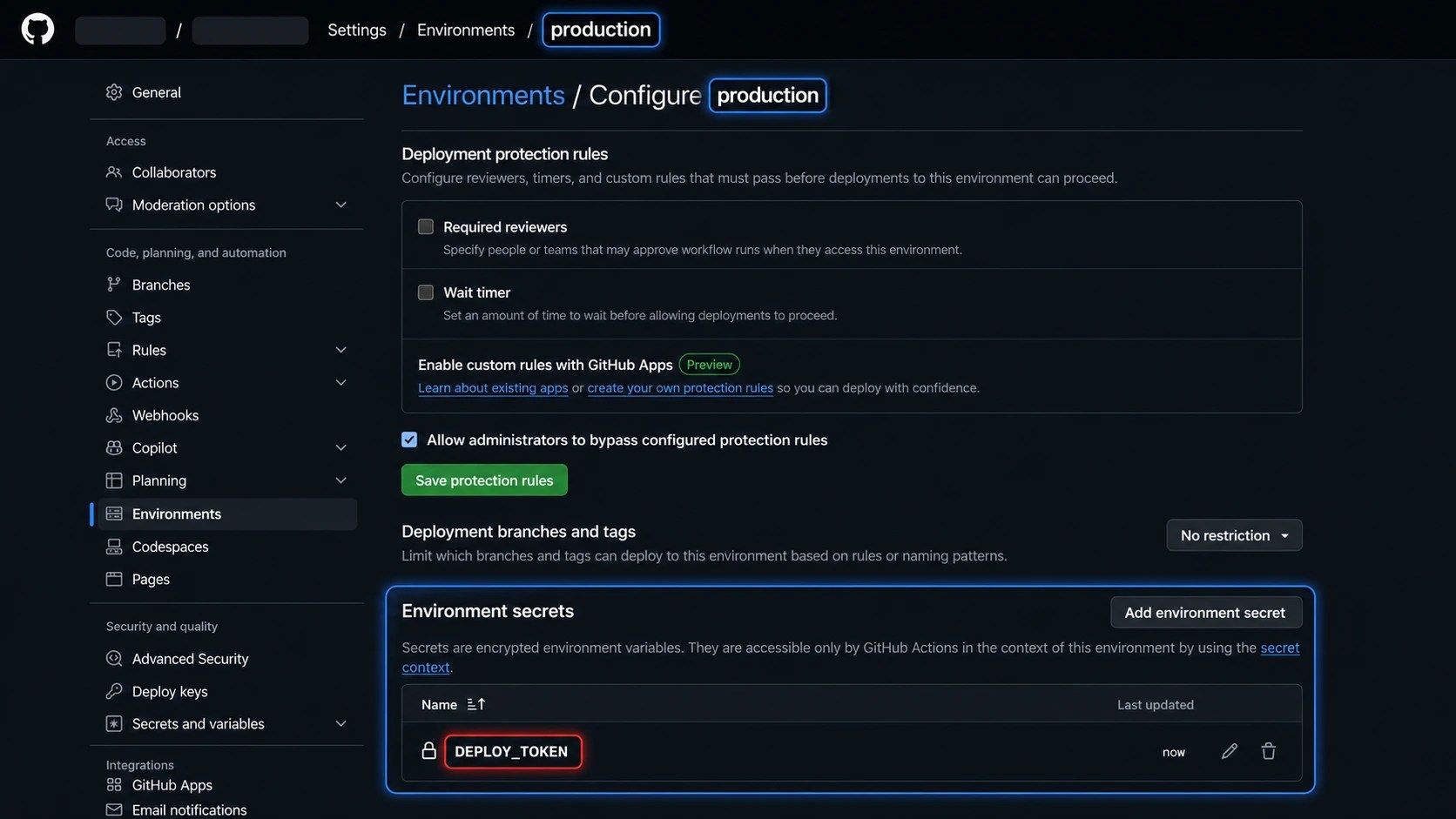
A secret stored in the production environment is not automatically passed to
a regular job, even when its name matches a repository secret. The deployment
job must reference that environment:
jobs:
  deploy:
    runs-on: ubuntu-latest
    environment: production
    steps:
      - name: Check required secret
        env:
          DEPLOY_TOKEN: ${{ secrets.DEPLOY_TOKEN }}
        run: |
          test -n "$DEPLOY_TOKEN" || {
            echo "::error::DEPLOY_TOKEN is unavailable in this run"
            exit 1
          }
If organization, repository, and environment secrets share the same name, the
secret at the lowest level takes precedence. In other words, an environment
secret overrides a repository secret with the same name. GitHub documents the
read timing and precedence in its
secrets reference.
Cause 3: The run was triggered by a fork or Dependabot
When a pull request from an external fork triggers a workflow, secrets other
than GITHUB_TOKEN are not passed to the runner. This is a security boundary
that prevents untrusted code from reading credentials, not a typo in your
workflow.
Regular Actions secrets are also unavailable to workflows triggered by
Dependabot events. GitHub’s
Dependabot on Actions reference
explains that these runs use Dependabot secrets and receive a read-only
GITHUB_TOKEN by default.
Design the workflow around that boundary:
- Run builds and static checks that do not need secrets on external and
Dependabot pull requests. - Run the real deployment in a separate workflow after the change is merged
into a trusted branch. - If Dependabot needs access to a private registry, create a Dependabot secret
with the required name.
Do not treat pull_request_target as a shortcut for exposing secrets. Running
unreviewed pull-request code with that event can create a privilege-escalation
risk.
Cause 4: The caller did not pass the secret to a reusable workflow
A reusable workflow does not automatically receive the caller’s secrets. Map
each secret explicitly, or use secrets: inherit when the workflows are
eligible to use it within the same organization or enterprise.
Caller workflow:
jobs:
  call-deploy:
    uses: ./.github/workflows/deploy.yml
    secrets:
      deploy_token: ${{ secrets.DEPLOY_TOKEN }}
Called .github/workflows/deploy.yml:
on:
  workflow_call:
    secrets:
      deploy_token:
        required: true

jobs:
  deploy:
    runs-on: ubuntu-latest
    steps:
      - name: Check required secret
        shell: bash
        env:
          DEPLOY_TOKEN: ${{ secrets.deploy_token }}
        run: |
          test -n "$DEPLOY_TOKEN" || {
            echo "::error::deploy_token is unavailable"
            exit 1
          }
Secrets must also be passed at every hop in a chain of reusable workflows. If
workflow A passes a secret to B and B calls C, B must pass the secret to C
again. GitHub’s
reusable workflow documentation
describes the mapping rules and inheritance limits.
Cause 5: The workflow checks secrets directly in an if: condition
GitHub Actions does not support referencing secrets directly in an if:
conditional. Assign the secret to a job-level environment variable, then use
that variable in the step condition:
jobs:
  deploy:
    runs-on: ubuntu-latest
    env:
      DEPLOY_TOKEN: ${{ secrets.DEPLOY_TOKEN }}
    steps:
      - name: Deploy only when the secret is available
        if: ${{ env.DEPLOY_TOKEN != '' }}
        run: ./deploy.sh
If the secret is required for deployment, fail with a clear error as shown in
the first Check required secret example instead of silently skipping the
step. Conditional execution is more appropriate when the secret enables an
optional feature.
If authentication still fails after the availability check passes
If the check reports available but the external service still returns 401
or 403, the value is reaching the runner. The next issue is the credential’s
validity, permissions, or target environment.
- Check whether the token has expired or was revoked by the issuing service.
- Confirm that the workflow is using the correct test or production endpoint.
- Confirm that the token has the minimum permissions required for the request.
- After updating the secret, start a new workflow run instead of relying on an
existing run.
Do not print the value for comparison. Issue a new credential, update the
secret, and use the API’s success or failure response to verify it.
The secret-name, reusable-workflow mapping, and environment cases in this guide
were checked in a separate test repository on both Ubuntu and Windows runners.
No secret values were printed during those checks.
Summary
When a GitHub Actions secret appears empty, first confirm the symptom with an
availability check that never prints the value. Then inspect scope, environment
selection, fork or Dependabot events, reusable-workflow mapping, and if:
usage in that order.
If no workflow run is created at all, diagnose the trigger before investigating
secrets. Start with ToolSolve’s
GitHub Actions push-trigger checklist.